Sync Configuration Throughout the Customer Lifecycle
Last updated: March 16, 2026
This article outlines how syncing is configured and managed across the different stages of a customer’s lifecycle — from initial sandbox testing to fine-tuning sync schedules in production.
1. During Onboarding: Setting Up the Sandbox
Customers typically begin integration setup in a sandbox environment, which is used for testing before enabling live syncs.
What to Expect:
No Automatic Syncing: By default, syncs do not run automatically in the sandbox.
Manual Testing: Customers can manually trigger syncs to test enabled models.
Model Selection: Customers can choose which models to enable for syncing. These models can be enabled for specific PMS platforms (e.g., MRI, AppFolio).
Customers can also trigger a sync on a specific integration with only certain models specified.
2. Going Live: Syncing in Production
Once in production, customers can configure sync behavior per integration.
Customers can configure a sync schedule for each integration in the Integrations > Sync Data and Configuration section.
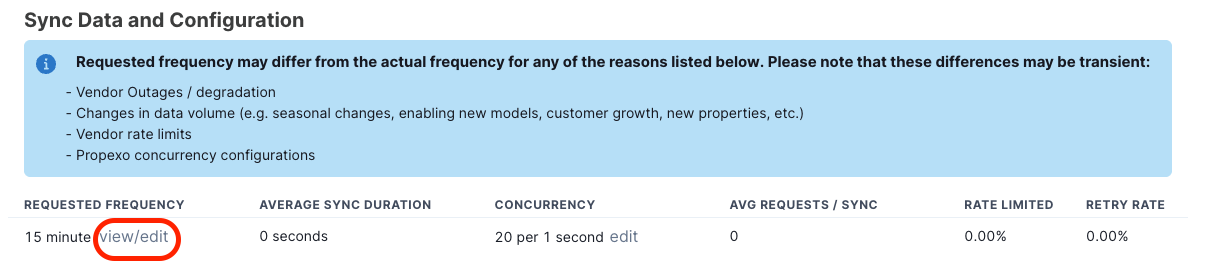
This schedule applies to all enabled models unless overridden by a manual sync.
Customers on our Professional plan can request to sync some models more or less frequently by contacting support.
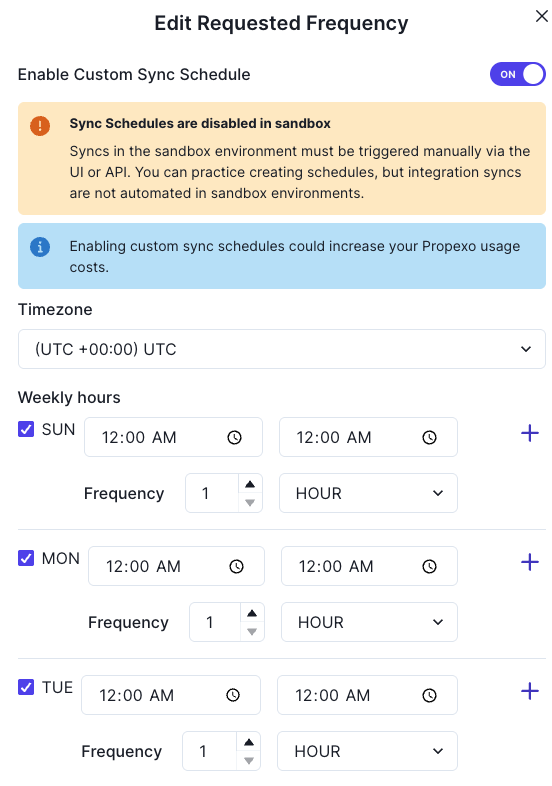
Customers on our Professional plan can also create a weekday-based custom sync schedule (for example, avoid syncing on weekends) by clicking Edit, then selecting Enable Custom Sync Schedule. Customers on our Growth plan can make sync customization requests to our support team.
3. Sync Optimization: Model-Level Overrides
After going live, customers can fine-tune how often specific models sync.
Model-level sync frequency can be adjusted per integration.
These changes must be made by the Propexo team. To request changes, contact support.
Examples:
Sync
employeesonce dailySync
listingsevery 2 hoursSync
leasesmore frequently for an MRI integration