Understanding Lead and Applicant Relationships in Events
Last updated: July 11, 2025
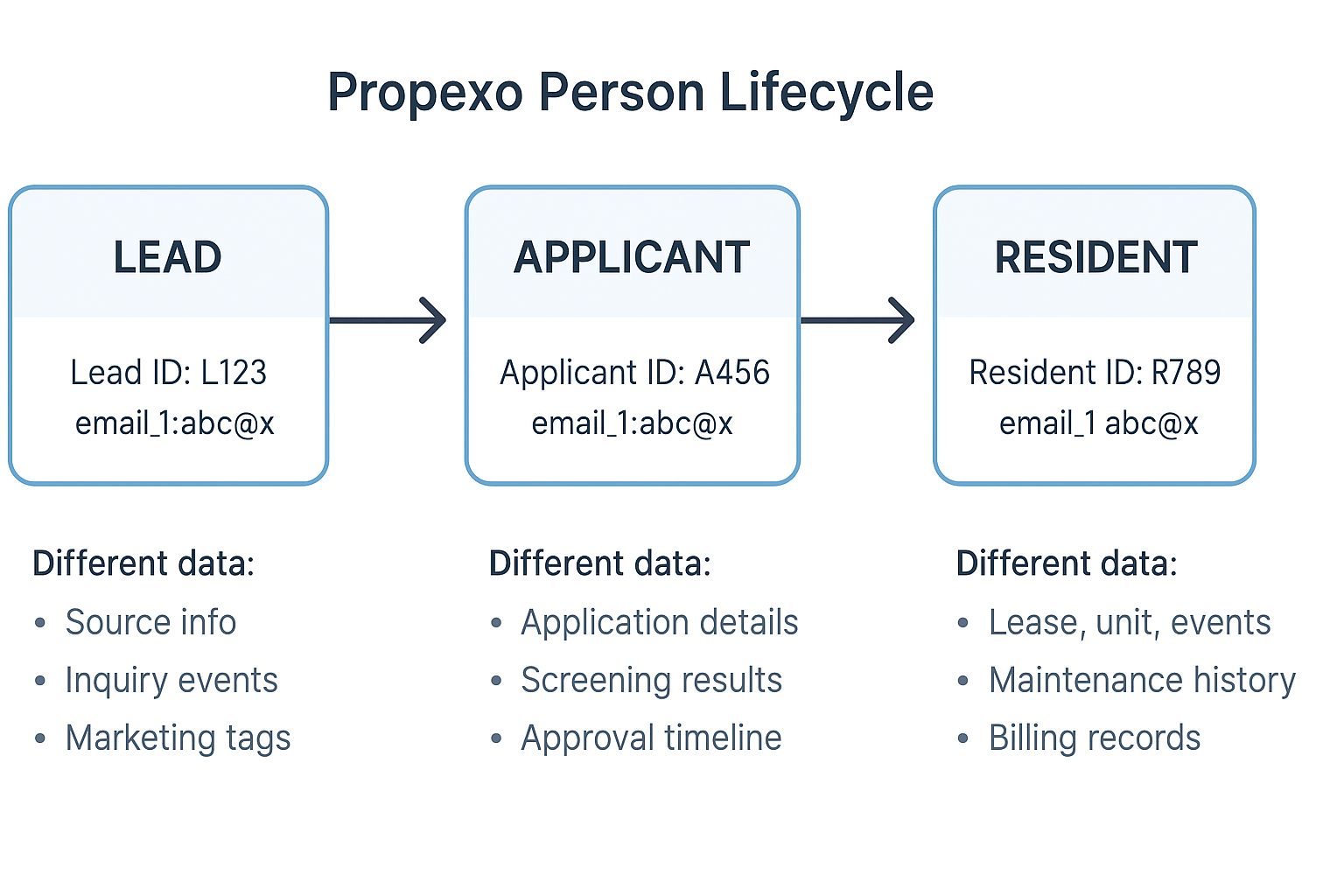
In Propexo, individuals progress through a structured lifecycle: Lead → Applicant → Resident. Understanding how this transition is managed in the system is key to ensuring accurate data association, event tracking, and record management across stages.
Each Stage Is a Distinct Record
Lead, Applicant, and Resident represent completely separate records with unique data structures and purposes. Each stage is designed to support a different phase of interaction:
Leads are prospective renters with inquiry dates, campaign sources, and marketing notes
Applicants are actively applying for housing with application metadata, background screening results, and approval status
Residents are individuals who have signed a lease with lease information, move-in/out dates, and maintenance history
These records are not merged as a person moves forward—they are created anew, with dedicated IDs and different associated event types.
Cross-Stage Tracking
Since each lifecycle stage creates a separate record with its own ID, we recommend using the email_1 field to consistently track a person across all lifecycle stages. This is especially useful for joining or correlating data across systems and phases.
Person Lifecycle in Propexo
Each individual typically exists as three separate records as they progress:
Lead: When a person first expresses interest, they receive a unique Lead ID
Applicant: Upon submitting a rental application, they receive a new Applicant ID
Resident: Once approved and the lease begins, a Resident record is created with a unique Resident ID
Event Associations and Lifecycle Stages
Events in Propexo are associated based on what stage the person was in when the event occurred:
During the Lead Stage:
Events may include
associated_lead_idsandassociated_applicant_ids(if they later became an applicant)
During the Applicant Stage:
Events may include
associated_applicant_idsandassociated_resident_ids(if they later became a resident)
During the Resident Stage:
Events include only
associated_resident_ids
⚠ For certain PMS, when a person becomes an applicant, the original lead record becomes static and is no longer updated. The same applies when transitioning from applicant to resident.
Querying Events Effectively
Use the appropriate query based on the lifecycle stage:
GET /events/?lead_id=xyzReturns only events from the lead stageGET /events/?applicant_id=xyzReturns events from the applicant stage plus any from their time as a lead
Best Practice: For a complete event history, always query using the latest lifecycle ID (i.e., use resident_id over applicant_id, and applicant_id over lead_id if available). Even better: query the leads & applicants you'd like to search events for first with the email_1 field, a consistent identifier across all three stages that lets you unify the person's data regardless of stage.
⚠ If multiple events and lifecycle stage changes occur between syncs, some events may not appear in Propexo due to how event associations are tied to a person's current lifecycle stage at the time of sync.
Example:
If an applicant signs a lease and becomes a resident between two syncs, the LeaseSign event may be missing in Propexo. This is because LeaseSign events are associated with the applicant record, but by the time the sync runs, the person has already transitioned to the resident stage—so the event is no longer associated with the now-static applicant record.