Why am I missing data or seeing incomplete information from my Property Management System (PMS) integration?
Last updated: March 23, 2026
If you notice discrepancies in the data returned from your Property Management System (PMS) integration, such as missing units or leases, this is likely due to the default data fetching methodology used by Propexo.
Understanding Data Fetching
By default, Propexo uses date filters to limit queries to the PMS API. This approach helps manage API rate limits and ensures efficient data synchronization. However, it may result in incomplete historical data.
Resolving Missing Data Issues
To retrieve all available data, including historical information, you need to perform a "back sync". This process extends the date range of our queries, allowing us to pull in a complete set of data from your PMS.
How to Perform a Back Sync
You can initiate a back sync in two ways:
Via the User Interface:
Navigate to the customer management section in your Propexo dashboard.
Locate the "Perform Back-Sync" option for the relevant integration.
Click on this option to initiate the back sync process.
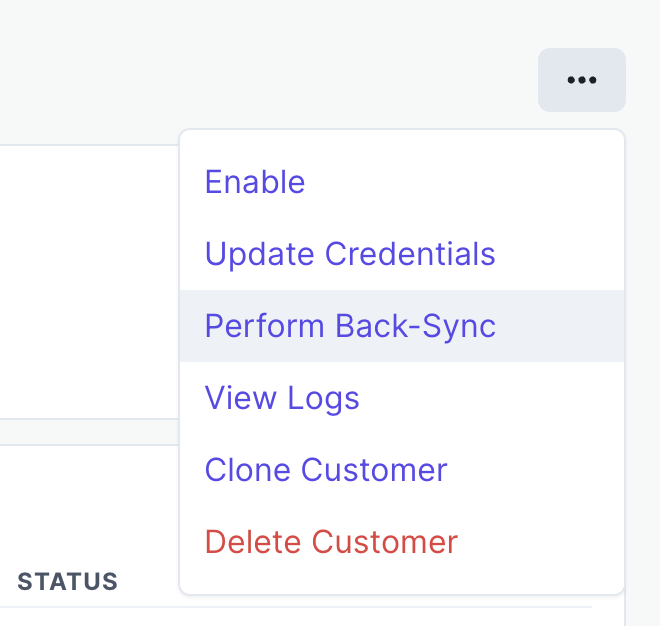
Via the Propexo API:
You can trigger a back sync programmatically using the Propexo API. For detailed instructions, refer to our API documentation on triggering a back sync.
Additional Considerations
If performing a back sync does not resolve your data discrepancies, there may be other factors at play, such as:
API access permissions
Integration configuration issues
PMS-specific limitations
In such cases, it's recommended to contact Propexo support for further investigation and assistance.
Further Reading
For more information on our data fetching methodology, please refer to our documentation on API concepts and data fetching.